Just Released!
Our biggest software update yet - 35+ improvements, including new features, gameplay enhancements, and fixes designed to make SKYTRAK easier to use and more immersive every time you play.
Explore 6.2
Features, Enhancements & Fixes
Major New Features
- A new connection wizard has been added to better streamline the device setup process.
- A new profile area has been added to easily manage your: Account, Settings, Stats, Device, Support, and Downloads.
Minor New Features
- My Bag has been overhauled to provide better usability and compatibility with game modes.
- After your first connection to a device, you can now download courses and ranges when not connected to the Launch Monitor.
- Club selection has been added to Course Play. If you have a bag setup it will use the clubs and distances provided in your bag, if not it will use a generic bag and distances for the recommend club.
- Hot keys have been added to Course Play Practice.
- Players other than "Player 1" can now be added and removed during a round of Course Play.
- The "Ball Data Only" UI has been updated to be in-line with the rest of the App.
- UI adjustments, for example hiding the minimap, will sustain until the user takes an action to alter the adjustment.
- Club names can now be renamed while doing a Club Compare.
- In-app notifications have been added to message New Releases (Courses, Ranges, and Versions) and Membership Status.
- Course Play drop options have been completely reworked.
- Support for additional Pin Positions (Thursday, Friday, Saturday, and Sunday) have been added. This positions will be updated when tournaments use the venue going forward.
- The Course Play on course Scorecard has been completely reworked.
- The Recent Activity area of the app has been completely reworked.
- Ground physics have been updated for all surfaces.
- A Play Through option has been added to Course Play to better allow RH and LH golfers to play together
Adjustments & Bug Fixes
- A Mulligans "Off" option has been added to Course Play Setup.
- You can now full screen on a second screen on iOS.
- Messaging has been improved around downloads and internet disconnections.
- "Plays Like" has been added to Course Play Practice.
- Green physics have been updated to better account for Green Speed settings.
- The ability to Auto Update courses and ranges has been added.
- "Tournament Mode" has been added to Course Play Setup. This will set Mulligans to "Off", lock altitude to “Course”, and Lie Penalty to "On".
- Tee Box markers have been added to Course Play.
- When playing local multiplayer the "Next Shot Info" screen will provide info for the player about to hit.
- When Putting and using Meters, elevation will now be displayed in Centimeters.
- Swapping between Normal Mode and Putting Mode has been added as a hotkey.
- Custom unit setups can now be configured for Elevation, Tee to Green, and On Green.
- Addressed an issue where if you took a drop after a mulligan only one stroke would be removed.•Addressed an issue where the expected distance value and line would not match on the minimap.
- Addressed an issue where the wind when set to random would not be retained upon a "Save and Exit".
- Addressed an issue where distance on holes would be measured straight-line as opposed to down the middle of the fairway.
- Addressed an issue where foliage could be between the camera and the ball causing the user to be unable to see their ball.
- Addressed an issue where Shot Score was not being properly calculated for Course Play Practice.
- Addressed an issue where Match Play Scoring would reset upon a "Save and Exit".
- Addressed an issue where Putting Settings were sometimes not retained upon a "Save and Exit".
- Addressed an issue where the selected Tee Box would change for the main account holder during a round.
- Addressed an issue where the hole distance in the top left did now properly update.
- A new connection wizard has been added to better streamline the device setup process.
- A new profile area has been added to easily manage your: Account, Settings, Stats, Device, Support, and Downloads.
- My Bag has been overhauled to provide better usability and compatibility with game modes.
- After your first connection to a device, you can now download courses and ranges when not connected to the Launch Monitor.
- Club selection has been added to Course Play. If you have a bag setup it will use the clubs and distances provided in your bag, if not it will use a generic bag and distances for the recommend club.
- Hot keys have been added to Course Play Practice.
- Players other than "Player 1" can now be added and removed during a round of Course Play.
- The "Ball Data Only" UI has been updated to be in-line with the rest of the App.
- UI adjustments, for example hiding the minimap, will sustain until the user takes an action to alter the adjustment.
- Club names can now be renamed while doing a Club Compare.
- In-app notifications have been added to message New Releases (Courses, Ranges, and Versions) and Membership Status.
- Course Play drop options have been completely reworked.
- Support for additional Pin Positions (Thursday, Friday, Saturday, and Sunday) have been added. This positions will be updated when tournaments use the venue going forward.
- The Course Play on course Scorecard has been completely reworked.
- The Recent Activity area of the app has been completely reworked.
- Ground physics have been updated for all surfaces.
- A Play Through option has been added to Course Play to better allow RH and LH golfers to play together
- A Mulligans "Off" option has been added to Course Play Setup.
- You can now full screen on a second screen on iOS.
- Messaging has been improved around downloads and internet disconnections.
- "Plays Like" has been added to Course Play Practice.
- Green physics have been updated to better account for Green Speed settings.
- The ability to Auto Update courses and ranges has been added.
- "Tournament Mode" has been added to Course Play Setup. This will set Mulligans to "Off", lock altitude to “Course”, and Lie Penalty to "On".
- Tee Box markers have been added to Course Play.
- When playing local multiplayer the "Next Shot Info" screen will provide info for the player about to hit.
- When Putting and using Meters, elevation will now be displayed in Centimeters.
- Swapping between Normal Mode and Putting Mode has been added as a hotkey.
- Custom unit setups can now be configured for Elevation, Tee to Green, and On Green.
- Addressed an issue where if you took a drop after a mulligan only one stroke would be removed.•Addressed an issue where the expected distance value and line would not match on the minimap.
- Addressed an issue where the wind when set to random would not be retained upon a "Save and Exit".
- Addressed an issue where distance on holes would be measured straight-line as opposed to down the middle of the fairway.
- Addressed an issue where foliage could be between the camera and the ball causing the user to be unable to see their ball.
- Addressed an issue where Shot Score was not being properly calculated for Course Play Practice.
- Addressed an issue where Match Play Scoring would reset upon a "Save and Exit".
- Addressed an issue where Putting Settings were sometimes not retained upon a "Save and Exit".
- Addressed an issue where the selected Tee Box would change for the main account holder during a round.
- Addressed an issue where the hole distance in the top left did now properly update.
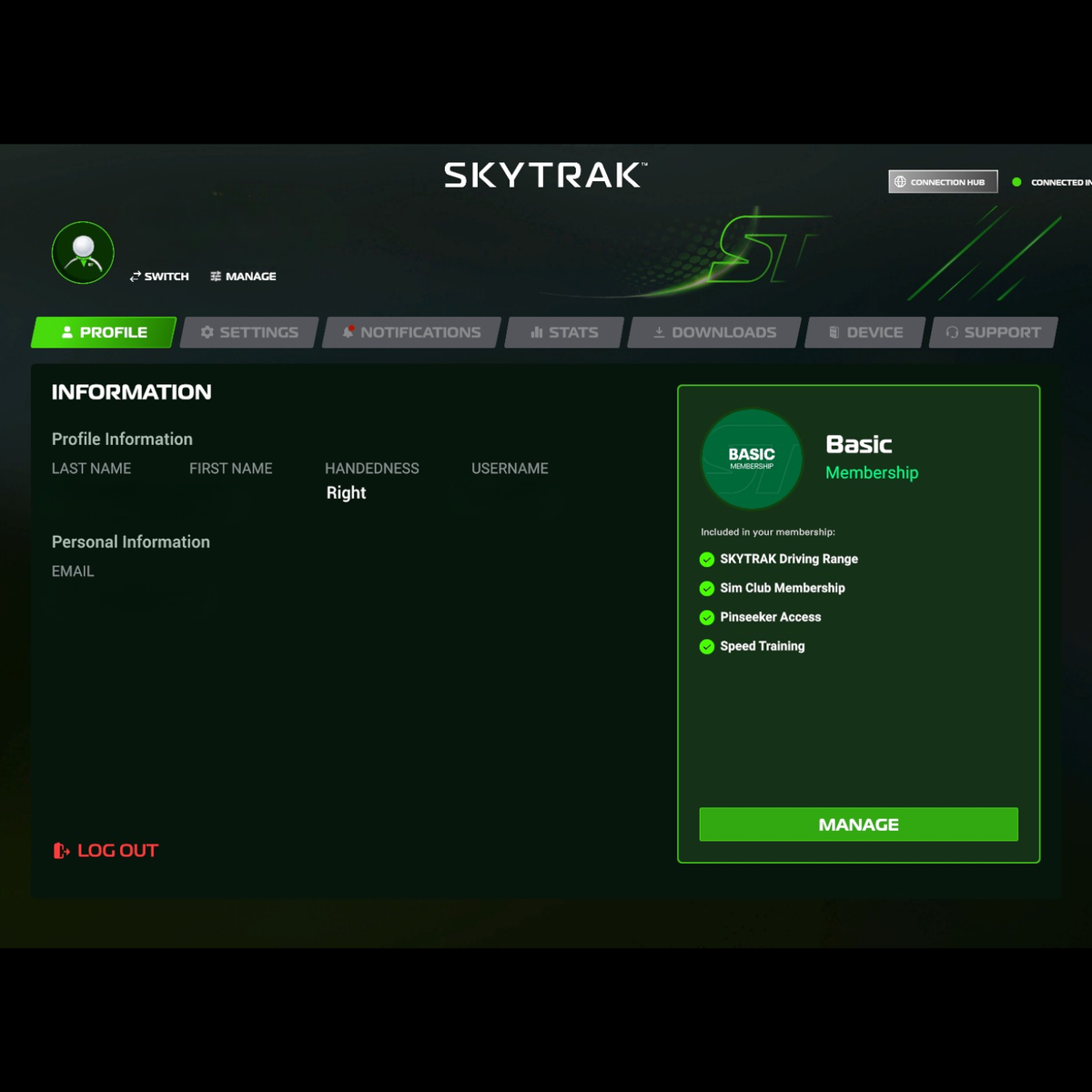
A Simpler & Smarter SKYTRAK
A new profile section makes it easier to manage your account, settings, stats, device, support, and downloads all in one place. Plus, a new Connection Wizard, in-app notifications, an improved My Bag, and a redesigned Recent Activity experience make navigating SKYTRAK easier than ever.
Download Software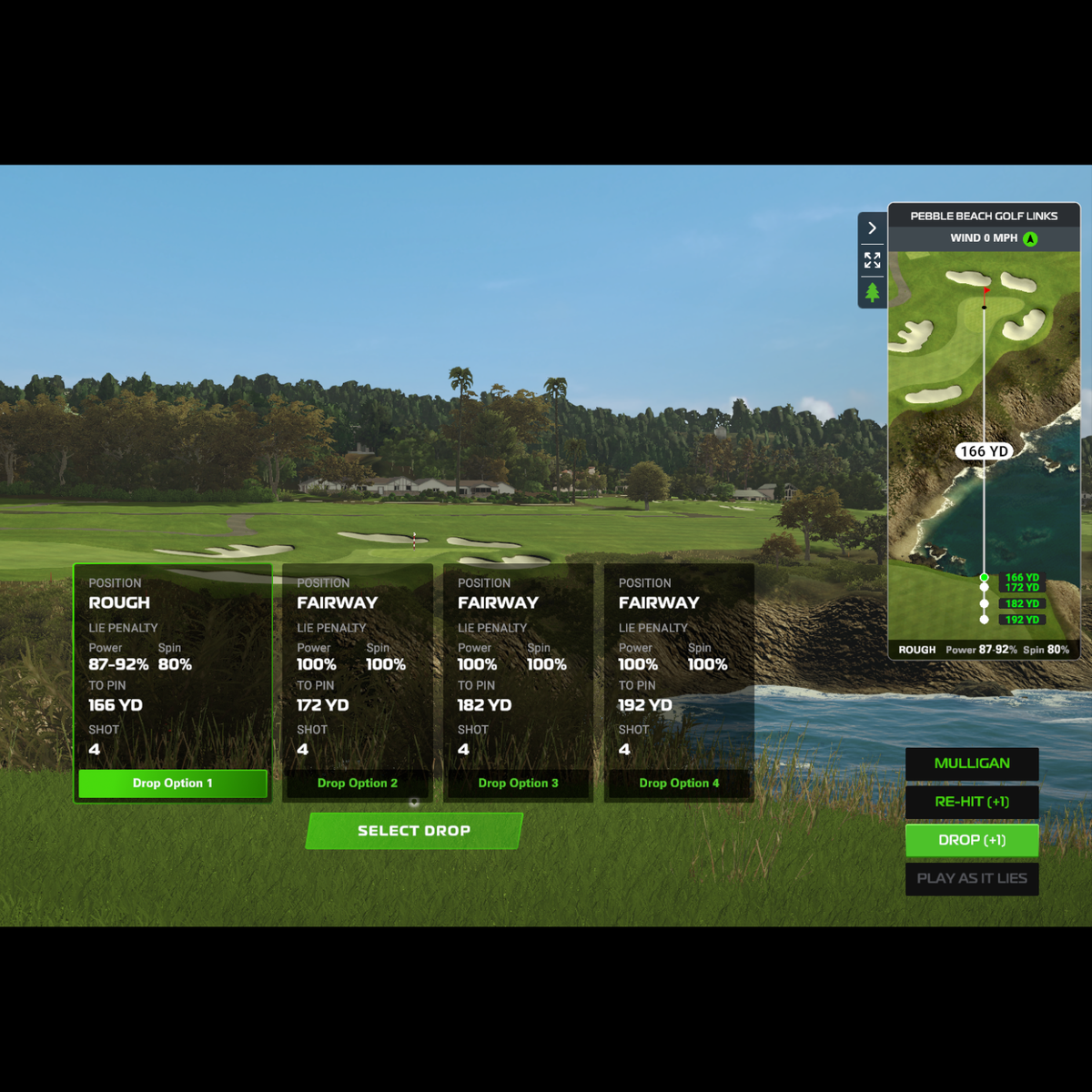
Improved Gameplay Experience
Course Play gets a major upgrade with improved ground and green physics, redesigned drop options, an all-new scorecard, club recommendations, new pin positions, tee box markers, and more. You’ll also find new options like Tournament Mode and the ability to add or remove players during a round.
Download Software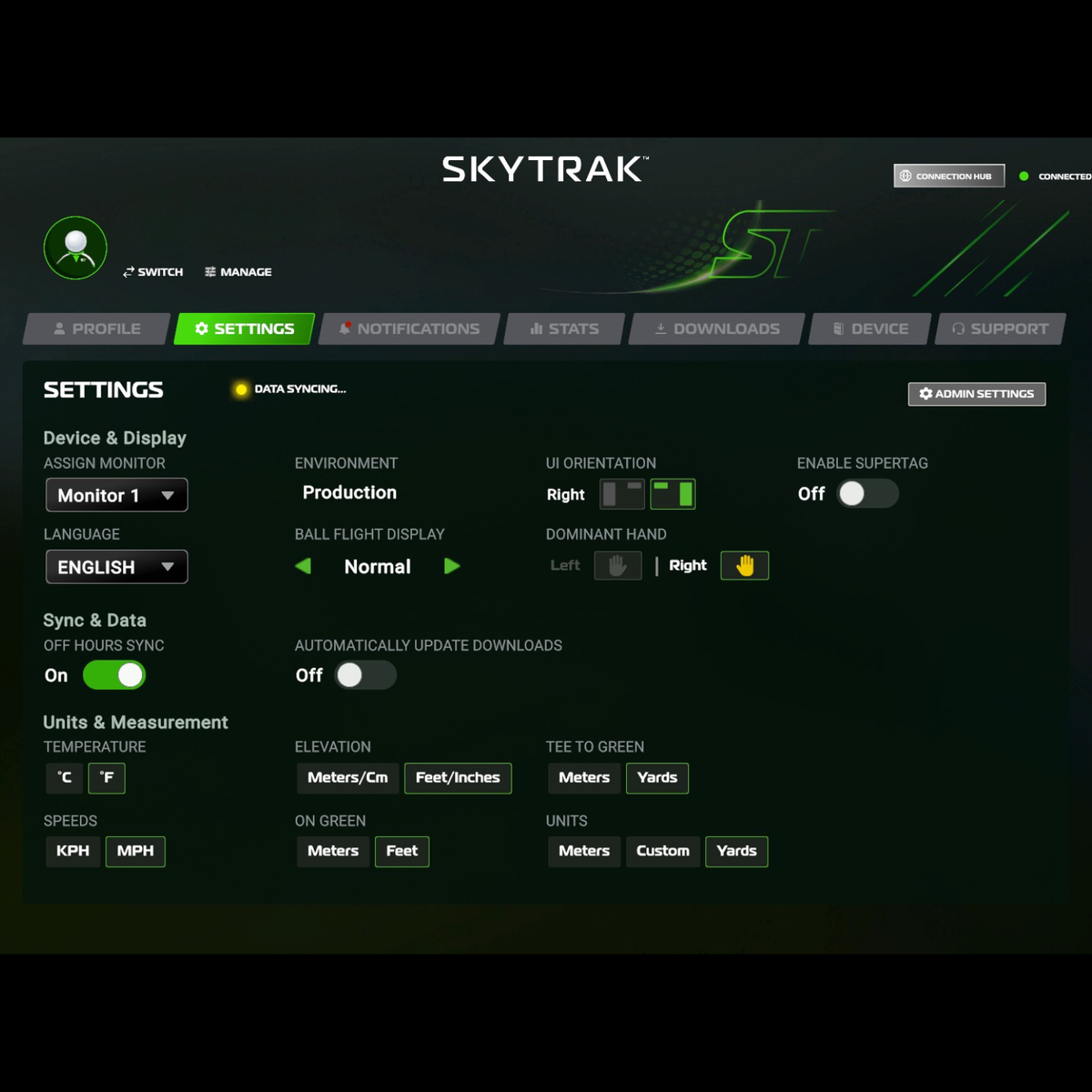
Smoother Play, More Control
Dozens of refinements make every session more seamless. Enjoy custom measurement settings, new hotkeys, auto-updating courses and ranges, improved download messaging, second-screen fullscreen support on iOS, and fixes across putting, scoring, distances, multiplayer, saved settings, and more.
Download Software